macOS · one conversation at a time
Keep the conversation, not just the backup.
Message Album exports a single Messages thread into a searchable offline archive: both sides of the conversation, the photos, videos and voice notes stored on your Mac, and a manifest of checksums. It opens in any browser, with no app, no account and no server.
- Requires macOS 15.7 or later. Apple silicon and Intel.
- No accounts and no telemetry. Your messages never leave this Mac.
- Reads your Messages library without modifying it.

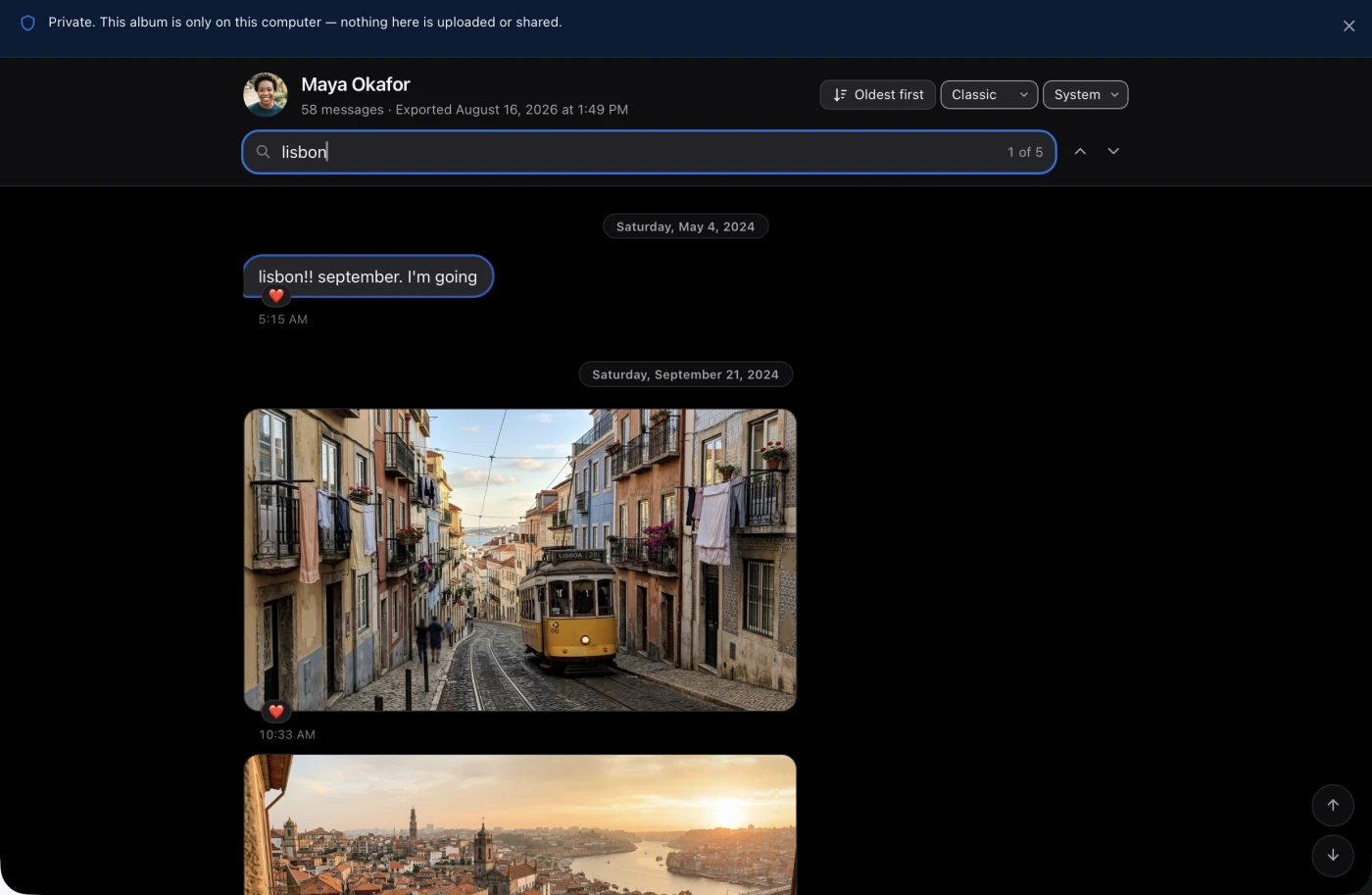
Maya Okafor
Not a screenshot
- ok I did the thing
- booked WHAT
- lisbon!! september. I'm going
- two weeks. I have not taken two weeks off in six years
- guess who is on a tram

- the actual tram. it's so much smaller than the pictures
No messages match your search.
Why an archive, not a backup
A backup restores a device. It doesn't hand you the conversation.
Backups are built to put a phone back the way it was. They are not built to give you one thread you can read, search, and still open in twenty years. The moment you leave the platform, cancel the storage plan, or delete the conversation on one device, a backup stops being a way to reach it.
It stays readable without Apple
An export is ordinary HTML, JSON and Markdown in a plain folder. Reading it later needs a browser, not an account, a subscription, or this app.
It survives leaving the platform
Switching to Android, retiring an Apple ID, or handing the Mac on doesn't take the archive with it. The folder is yours.
It cannot be quietly edited
Every archive ships a manifest of SHA-256 checksums, so you can prove years later that the copy in your hands is the one that was exported.
What you actually get
One folder. Open index.html and the conversation is there.
Every export is a self-contained, timestamped folder. The offline reader inside it uses no framework, no CDN, no external font and no web server, because anything it depended on would be one more thing that can disappear before you next open it.
Sarah Chen — 2026-08-09 14.22.31/
- index.html Open it in Safari, Chrome or Firefox. No server needed.
- assets/ The offline reader: framework-free HTML, CSS and JavaScript.
- data/ The transcript data the reader loads.
- attachments/ The images, videos, audio, stickers and documents held on this Mac, copied at original quality.
- transcript.json Complete versioned archival data.
- transcript.md A readable chronological transcript.
- transcript.csv Flat rows for analysis. Optional.
- manifest.json Source and output counts, warnings, sizes and SHA-256 checksums.
Open a sample album A real export. Fictional people, so nothing here is anyone's private conversation.
What it does
Both sides of the conversation
Not a roll of screenshots. Every message sent and received, in order, with timestamps, attachments and the sender's name where it can be resolved.
Attachments at original quality
Photos, videos, voice notes, stickers and documents on this Mac are copied into attachments/ untouched, never re-encoded or downscaled. Ones that Messages left in iCloud are reported, not silently skipped.
Reads iPhone and iPad backups
Point it at a Finder backup stored on this Mac, encrypted or not, and export a thread that never synced to the Mac's own Messages library.
Names and faces, resolved locally
For one-to-one threads, a phone number or email becomes that person's name and contact photo, read from Contacts on this Mac and embedded only in the export.
Immutable, checksummed snapshots
Each export is a new timestamped folder carrying SHA-256 checksums for everything in it. Re-exporting a conversation never overwrites an earlier archive.
Repeat exports cost almost nothing
When the destination already holds an earlier archive of that thread, byte-identical attachments are cloned rather than copied. On APFS, exporting a large conversation again adds almost no disk.
Warnings instead of silent gaps
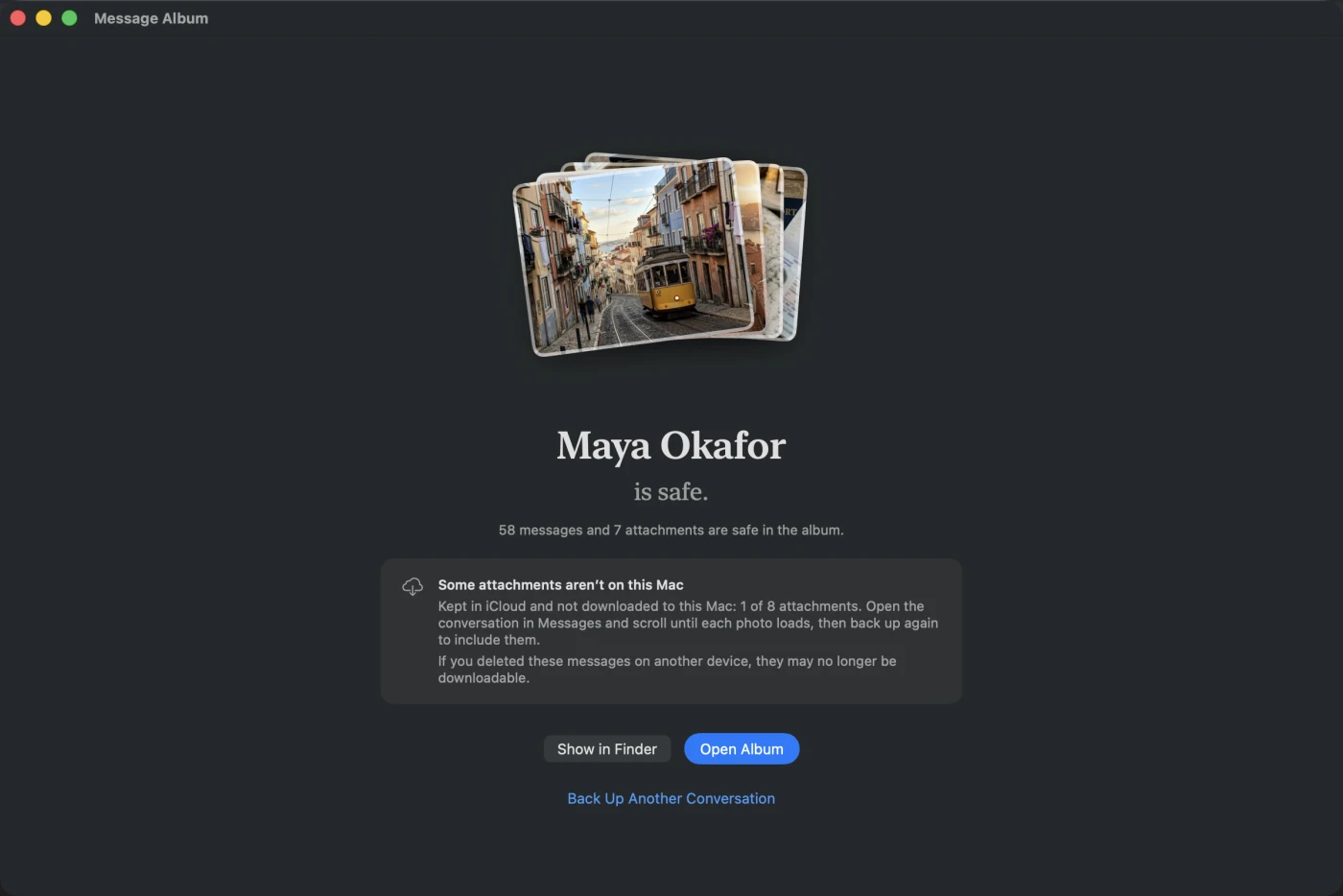
Attachments that were never downloaded to this Mac, and Apple-private payloads that cannot be decoded, are recorded as explicit warnings in the manifest rather than quietly dropped.
Built to outlive the app
The exported reader uses no framework, CDN, external font or server, and the archive schema is versioned and independent of Apple's private database format.
Formats
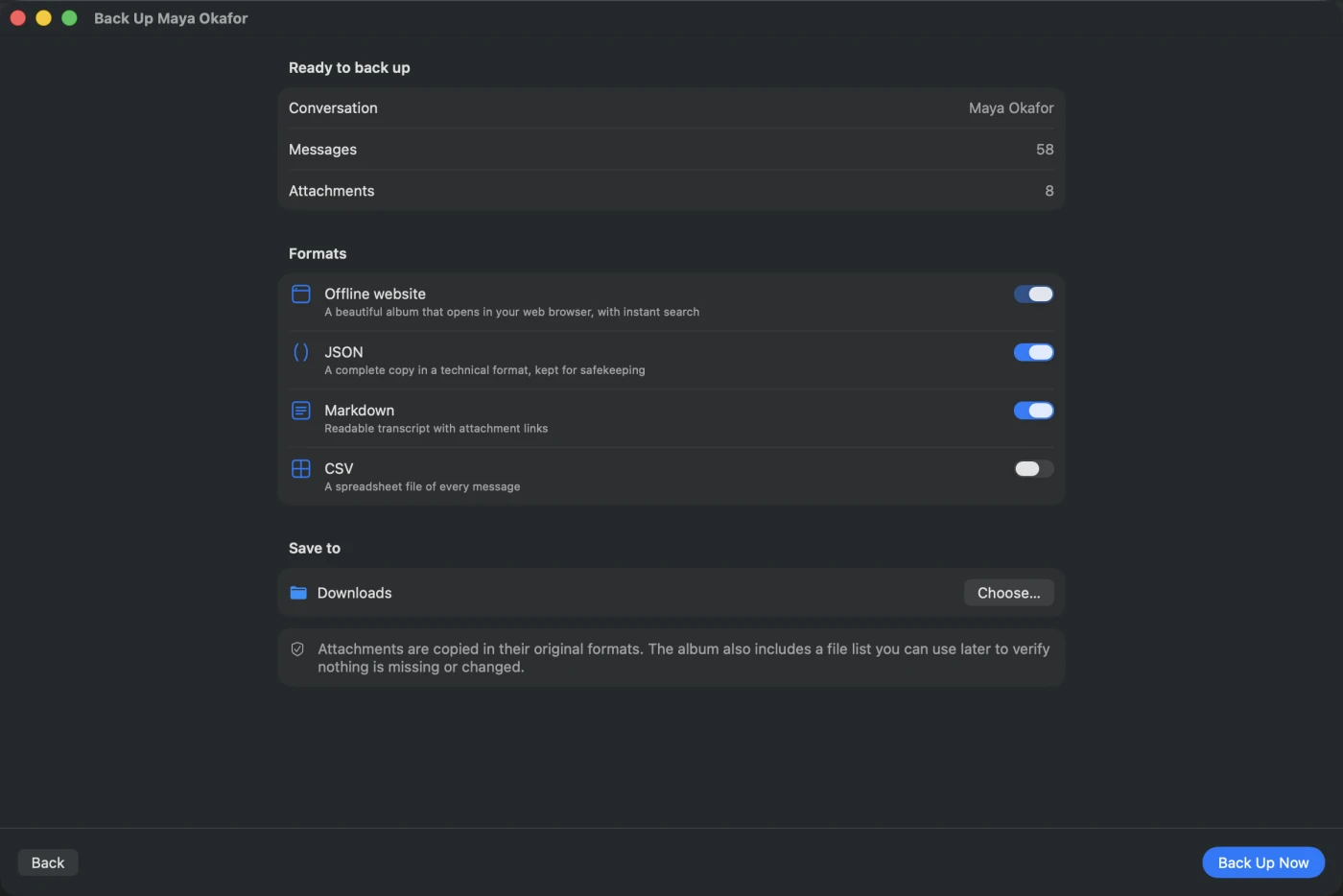
A website to read, and three formats to keep.
Offline website
The primary output. A searchable, iMessage-style reader that runs from the folder itself.
JSON
Complete versioned archival data, in a schema kept deliberately independent of Apple's.
Markdown
A plain chronological transcript that reads fine in any text editor.
CSV
Flat, analysis-friendly rows. Off by default, on when you want it.
How it looks
Three themes, each in light and dark.
The archive is something you will open again in ten years, so it should be pleasant to sit in. Pick a theme when you export, or switch it later from inside the archive itself. The reader remembers the choice, and every palette is contrast-checked so long conversations stay readable.
Classic
Apple-native. What Messages looks like on a Mac.
Paper
Warm and printed, for an archive you mean to keep.
Nocturne
Cool and quiet. The one this website uses.
Where it reads from
The Mac's own library, or an iPhone backup sitting on it.
This Mac
The Messages library already synced to this Mac, opened through SQLite's read-only and query-only modes so an export can never write to it.
An iPhone or iPad backup
Any Finder backup stored on this Mac, encrypted or not, listed by device name and backup date. Encrypted backups are unlocked in memory only, and only the Messages database and the attachments of the thread you are exporting are decrypted.
Before you buy
What it does not do.
Message Album copies what is stored on your Mac. That is the whole shape of the product, and it decides what an album can contain. Read this before buying rather than after.
It cannot pull anything out of iCloud
If Messages in iCloud has kept older photos and videos in iCloud instead of on this Mac, they are not here to copy. Message Album never contacts Apple, and no third-party app can sign in to an iCloud account to fetch them: Apple's account authentication is closed to software outside its own. Opening the conversation in Messages and scrolling back through it is what brings those attachments down.
It tells you what is missing first, and for free
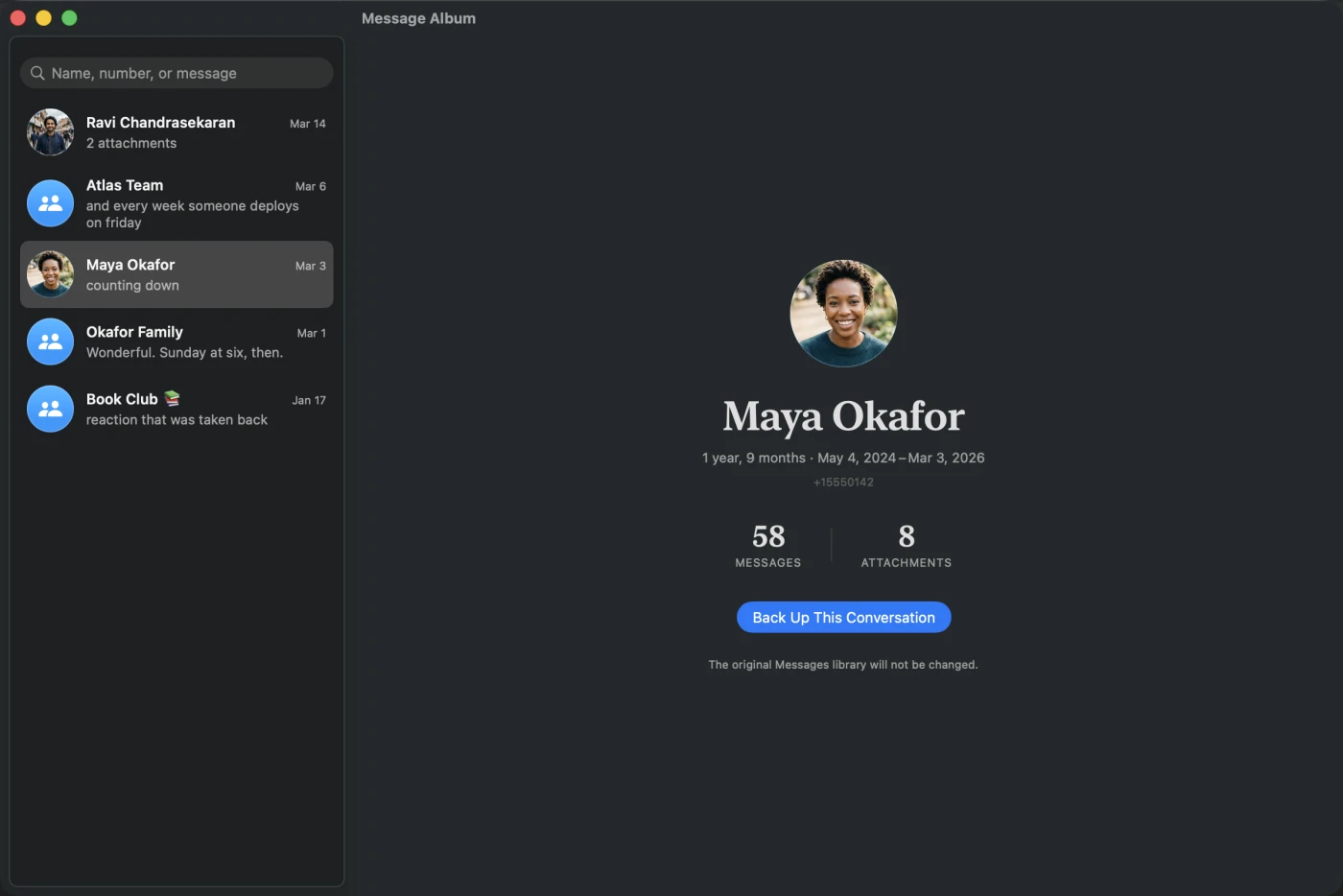
Select a conversation and Message Album counts the attachments that are not on this Mac and says so on screen, before you buy anything. The free version exports the last 7 days of any thread in the full format, so you can see exactly what your own library yields before paying. Nothing is ever dropped in silence: gaps are named in the album and recorded in manifest.json.
It cannot recover what was deleted
With Messages in iCloud on, deleting a conversation on one device removes it everywhere, and after Apple's 30-day Recently Deleted window those attachments are gone from iCloud for good. No export tool can bring them back. If a conversation still exists on this Mac and nowhere else, export it before you investigate anything else, and do not force a sync.
It reads a backup, not a plugged-in phone
iOS does not let a Mac read the Messages database over the cable, so no app can export straight from a connected iPhone. Message Album reads this Mac's own Messages library, or a Finder backup of an iPhone or iPad already stored on this Mac. Local backups carry your messages whether or not you encrypt them.
One conversation at a time, and no direct PDF
There is no button that exports your entire library at once; each album is one thread. The main output is an offline website rather than a PDF, because a PDF cannot hold playable video or original-quality media. Open the album and use Print, then Save as PDF, when you need one.
If any of this makes Message Album the wrong tool for what you are trying to do, that is worth knowing now. The free version is there so you can find out with your own conversations rather than take our word for it.
Privacy
Nothing leaves your Mac. There is nowhere for it to go.
- No accounts and no sign-in. Exporting is entirely offline: no network request is made while an album is being written.
- No analytics, no telemetry and no crash reporting. The app makes two kinds of network request, ever: checking a licence key against api.keybee.app when you activate or deactivate one, and asking messagealbum.com whether an update exists. It sends the key and a device identifier, never your messages.
- The Messages database is opened in SQLite's read-only and query-only modes, so an export cannot modify it.
- Contact names and photos are read from the Contacts app on this Mac and embedded only in the local export. Deny access and the export continues with the original phone number and an initials avatar.
- Encrypted backup passwords are used in memory and never written to disk.
macOS protects ~/Library/Messages, so Message Album needs Full Disk Access before it can read anything. You grant it in System Settings, and you can revoke it at any time.
Try it first
The free version backs up the last 7 days of a conversation.
You can install Message Album and make a real album before paying anything. The free version writes the conversation's final week, complete with its photos, videos and voice notes, in exactly the format you would get after buying. Those 7 days are counted from the conversation's newest message, not from today, so a thread from years ago still keeps its final week.
- Every album states plainly whether it is complete, so a partial backup can never be mistaken for the whole conversation.
- Buying unlocks the rest. Back the same thread up again and nothing is left out.
- Nothing expires. The albums you made for free stay readable forever, with or without a licence.
Keep the conversation, not just the backup.
One purchase, no subscription. Message Album is sold directly rather than through the Mac App Store, because reading the Messages library requires Full Disk Access, which the App Store sandbox does not permit.
One-time purchase
US$29
- Unlimited: every message and attachment, in as many conversations as you like.
- For one person, on the Macs you own.
- Free updates within the current major version.
- Exports you have already made keep working, with or without the app.
- Prices are in US dollars. Local tax is added at checkout where it applies.